ANT4010 Antenna used with EIM4010 Equipment Interface Module
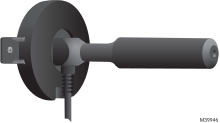
The optional ANT4010 is compatible with the EIM4010 Equipment Interface Module used with Redlink™ 3.0 ElitePRO thermostats. This is typically not needed, but is used when Redlink™ communication between the thermostat and EIM is impeded (Example: EIM4010 mounted inside a rooftop unit housing).
Package includes:
-
Antenna with 118 Inch cable. RP-SMA Male connection
-
Mounting bracket for wall-mounting
-
RP-SMA Female to MMCX Male Cable
-
2 mounting screws
Installing ANT4010 Antenna (if needed)
-
Turn off power to the HVAC equipment.
-
Mount and wire the EIM4010 to the HVAC equipment.
24 VAC is needed at the ElitePRO thermostat. That can come from R and C at the top of the EIM4010 or from a separate 24 VAC transformer. Mounting instructions and wiring diagrams can be found on Installing Equipment Interface Module (if used).
-
Select a mounting location for the antenna. Make sure there are not metal or concrete barriers between the antenna and the Redlink 3.0 thermostat. Electrical panels and motors can cause interference when in close proximity to a Redlink antenna.
-
Mount the antenna using one of the following methods:
Option 1: Mount using magnet
If mounting to a metal surface, attach the antenna using the built-in magnet. The mounting base is not required.
Option 2: Screw mounting base to wall
To mount the antenna on a non-metal surface, hold the antenna against the mounting surface. Slide the mounting base over the antenna shaft until it is fully seated, ensuring the cable passes through the slot in the mounting base.
-
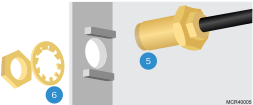
Feed the threaded end of the RP-SMA female to MMCX male. Cable through the left side of the EIM4010 housing.
-
Attach the washer and nut to the female connection on the cable. Snug to hold securely to the side housing of the EIM. Do not over-tighten.
-
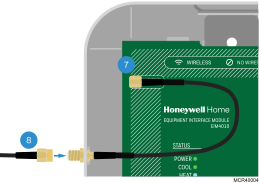
Attach the other end of the cable to the antenna connector located on the upper left side of the circuit board. This is a push-fit connection. Use caution and avoid applying excessive force.
-
Thread the male end of the Antenna over the female end of the cable attached to the EIM4010.
-
Slide the Antenna switch to the “External” setting (down) on the EIM4010.

-
Turn power back on and Link the ElitePRO thermostat to the EIM.
See Installing Equipment Interface Module (if used) for more information.