Features
ENERGY STAR®
|
|
|
.svg)
Capabilities
-
Redlink 3.0 wireless accessories. S1000, S1100, and S1200 work with Redlink 3.0 wireless accessories
-
Flexible scheduling allows you to choose location-based temperature control (Auto Away technology), program a set schedule or use a combination of both to make sure your home is always comfortable. Refer to Scheduling and Auto-Away for more information.
-
Built-in radar sensor can be used with wireless sensors as part of the priority comfort settings and can transition from idle to active screen on approach (
-
Tip: The First Alert App can be used to manage multiple thermostats and multiple users in a household.
-
Smart Alerts: The ElitePRO™ Series Thermostat can send alerts for occurrences such as extreme indoor temperatures and reminders for filter changes and other required maintenance.
-
Auto change from Heat to Cool: When Auto mode is selected, the ElitePRO™ Series Thermostat can automatically determine whether your home needs heating or cooling to reach the desired temperature.
-
Adaptive Recovery: The ElitePRO™ Series Thermostat learns your heating and cooling cycle times to make sure the system delivers the temperature you want, when you want it. See Adaptive Recovery (Sometimes called “Adaptive Intelligent Recovery”) to learn more.
-
Video Doorbell integration. (select models only, see Connecting a Video Doorbell (S1200 only)).
-
Indoor air quality monitoring and viewing. (select models only, see Indoor Air Quality Monitoring (S1100 and S1200 only)).
-
Control a humidifier, dehumidifier, or ventilator.
-
Light Commercial features:
-
Commercial language (Occupied/Unoccupied)
-
Temporary override (Permanent Hold is not allowed)
-
Temporary override duration limited to the value set by the installer
-
Adjustable ramp rates
-
Ability to manually initiate occupancy
-
Custom name display on the home screen
-
Remote setback using an occupancy sensor and/or onboard sensor
-
Economizer or Time-of-Day output support
-
Pre-occupancy purge function
-
Additional dehumidification control options
-
Heating and Cooling Status Display
Calling for heat
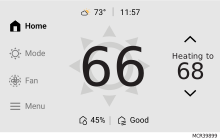
When the thermostat is calling for heat, there will be a sun icon behind the room temperature reading on the display and the thermostat will show “Heating to” (rather than “heat to”) above the heat setpoint.
Calling for Cool
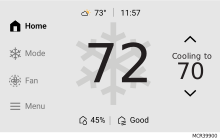
When the thermostat is calling for cooling, there will be a snowflake icon behind the room temperature reading on the display and the thermostat will show “Cooling to” (rather than “Cool to”) above the cool setpoint.
If “WAITING FOR EQUIPMENT” is shown in the display, the thermostat is delaying the heat or cool call to protect the equipment from short cycling. The delay should not last more than 5 minutes.
AUX Heat Indication:
Display shows “Using Auxiliary heat” above the room temperature.
Matter Setup
The ElitePRO™ Series Thermostat supports Matter. At thermostat, select the Menu icon. Then choose Matter and follow the instructions (refer to Getting the Most from the ElitePRO™ Series Thermostats for more information).