Installer Options
To access the Installer options menu:
-
Touch the Menu icon on the bottom left of display
-
Select Thermostat Information.
-
Write down the date code from that screen. Then touch the left arrow at top of display to go to previous screen.
-
Under menu select Installer Options and enter date code.
Installer Options Menu
Installer Setup
Setup thermostat. See Installer Setup Options (ISU).
Installer Test
While running equipment in test mode a timer indicates the run time during the test. Equipment automatically shuts off after 30 minutes if the installer does not end a test before that time.
- Heat: Select Heat stage(s) to test
-
Em heat: Test Emergency Heat. (For heat pumps with backup heat only)
-
Cool: Select Cool stage(s) to test
-
Fan: Turn fan on or off. If multiple fan speeds, test each speed.
-
Other
-
Test humidifier
-
Test Dehumidifier
-
Test Ventilator
-
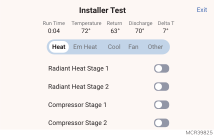
If discharge and return sensors (RATS & DATS) are used with ElitePRO™ Series Thermostats and EIM, the display shows these readings and the delta during installer test.
Devices & Sensors
See Devices and Sensors (S900 doesn’t have this setting).
Thermostat Information:
Equipment Interface Module:
-
Firmware version
-
Wireless signal strength
Indoor Air Sensor:
-
Firmware version
-
Battery strength
-
Wireless signal strength
-
Temperature and Humidity readings
-
Options:
-
Rename sensor (select Room name)
-
Use Motion (Offers the option of not using motion sensing from one or more sensors when Active Rooms is selected in the priority menu.)
-
Motion Sensitivity (HIGH = Triggered when very little motion is detected, MEDIUM = triggered when a moderate amount of motion is detected, LOW = triggered only when a lot of motion is detected).
-
Delete (Removes that sensor from the thermostat).
-
Blink lights (Will make the light on the indoor sensor you selected blink to help identify which sensor is matched with each name in the sensor menu.)
-
Outdoor Air Sensor:
-
Firmware version
-
Battery strength
-
Wireless signal strength
-
Temperature and Humidity readings
-
Delete (option only shown in the "Devices & Sensors" menu when accessed via "Installer options" menu).
Reset
-
Reset Schedule
-
Delete all Devices (Redlink Accessories)
-
Reset Matter
-
Reset WiFi (removes thermostat from network)
-
Factory Reset (this returns the thermostat to the state it was in prior to installation)