Installing Equipment Remote Module (if used)
This accessory will be available in a future release.
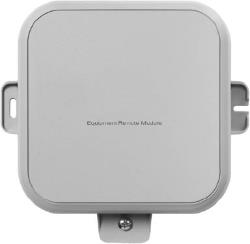
About the ERM4010
-
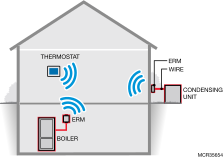
Wireless Redlink™ communication between condensing unit/ compressor or boiler and thermostat.
-
For radiant or single-zone forced air applications only.
-
Eliminates the need to run additional wires to your equipment, for example, during a heat pump upgrade.
-
Suitable for outdoor use.
-
Temperature sensor terminals for outdoor temp sensors or indoor freeze protection.
-
LEDs for easy installation checkout.
-
May reduce damage to homes since wiring/drilling is eliminated.
Installation Checklist
Materials Supplied
-
ERM4010
-
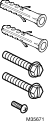
Wall Anchors (x2) and Mounting Screws (x2)
-
Extra Cover Screw (optional)
-
Installation Guide
Tools Needed (not supplied)

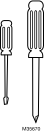
-
Drill
-
Nut Driver Attachment for Drill
-
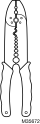
Wire Stripper
-
Small Flathead Screwdriver
-
Phillips Screwdriver
-
120/240 VAC to 24 VAC transformer and outdoor enclosure (not needed if there are two wires from indoor unit to outdoor unit)
Installation
-
The ERM is not compatible with Multi-Zone systems.
-
If your location has metal siding, the ERM’s signal may be affected. If there is no communication or poor signal strength, consider a different location.
-
An ElitePRO Redlink thermostat will only allow one of the following configurations:
-
Enrolled with a single boiler configured ERM;
-
Enrolled with a single compressor configured ERM;
-
Enrolled with a single boiler-configured ERM and enrolled with a single compressor-configured ERM.
-
Mounting
-
Use two screws and wall anchors to attach the ERM to the exterior wall near the compressor. The location should be at least 3 feet above ground and oriented with the two wire exits facing downward.
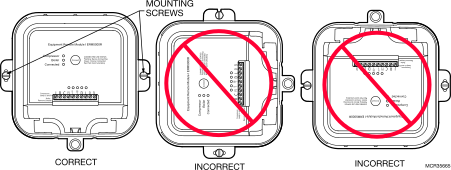
Mounting orientation
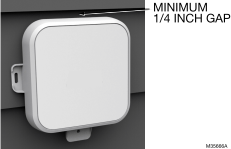
If mounting on lap siding, allow space for the cover to be removed.
Wiring
-
Make sure power to compressor/boiler is off.
-
Remove the front cover by loosening the cover screw and lifting up from the bottom of the ERM.
-
Remove 3 to 4 inches of the cable’s outer sheathing, then remove 3/8 to 1/2 inch of insulation from each wire.
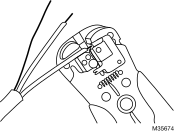
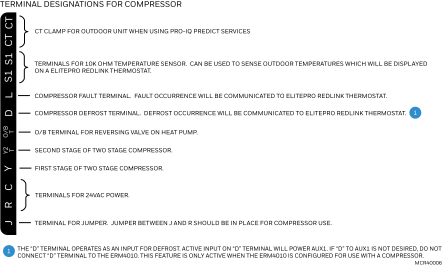
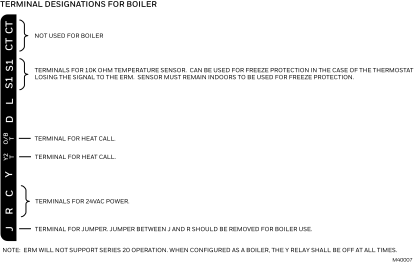
-
For compressor applications:
Leave the jumper between terminals J and R in place.
For boiler applications:
Remove the jumper between terminals J and R.
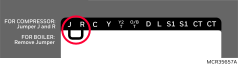
-
For compressors and boilers:
Connect a 24 VAC power source to the R and C terminals on the ERM.
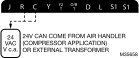
-
Connect terminals from the ERM to the appropriate terminals on the compressor/boiler control board.
Compressor
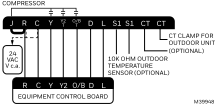
Jumper J to R as shown above.
Boiler
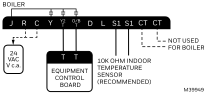
Remove J to R jumper as shown above.
Once power is connected, the "Compressor" (or "Boiler") LED should illuminate green.
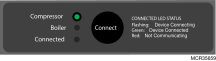 OR
OR 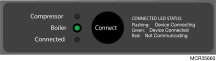
-
For compressors and boilers:
Put the thermostat in pairing mode.
New thermostat installation: When going through initial setup, the thermostat will ask “Is there an Equipment Interface module (EIM)?”. This refers to an EIM, not an ERM. The next screen asks if you have any Redlink devices. The ERM is a Redlink device, so select “add device”, and then follow the on screen instructions.
Existing thermostat installation: Select MENU > DEVICES AND SENSORS > ADD and then follow the on screen instructions.
-
Once the thermostat prompts you to do so, press and quickly release the “Connect” button on the ERM.
When the ERM is connected to the system, the ERM’s “Connected” LED will be solid green and the thermostat will show “ERM” in the DEVICES AND SENSORS menu.
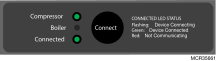 OR
OR 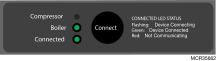
-
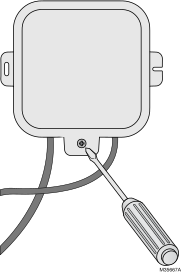
Attach cover and secure with bottom screw.
Checkout
-
Restore power to the HVAC equipment and thermostat.
-
Go to the Installer Test and turn on the heating or cooling equipment. (you could also do so from homescreen, but installer test will bypass any compressor protection delays).
-
Observe the ERM is running the heating/cooling equipment as expected.
-
Suspend the call for heat/cooling when the installer test is complete and touch “home” to return to the homescreen.