Sensor Installation
- Sensor Installation
- Wireless Indoor Sensor Installation
- Wireless Outdoor Sensor Installation
- Selecting Optional C7735A1000 Return Air Temperature Sensor Mounting Location
- Selecting Optional C7735A1000 Discharge Air Temperature Sensor Mounting Location
- Installing Optional C7735A1000 Discharge and/or Return Air Temperature Sensors
- Installing Wired Indoor Sensor
- Installing Wired Outdoor Sensor
- Floor/Slab Sensor
Wireless Indoor Sensor Installation
C7189R3010 Wireless Indoor Sensor
-
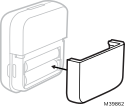
Remove cover from base and Insert (2) AAA Alkaline batteries in the sensor.
-
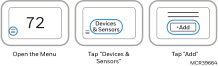
At the thermostat, select Menu.
-
Tap Devices & Sensors.
-
Tap Add.
Follow the on-screen instructions.
-
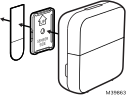
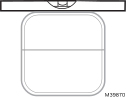
Snap the sensor onto the wall-plate.
-
Adhere the included command strip to the wall-plate. Then adhere the sensor to the wall. Level sensor for appearance.
Placement Tips
-
DO place about 5 feet above the floor.
-
DO place on inside walls.
-
DON’T place behind furniture or doors.
-
DON’T place in direct sunlight.
-
DON’T place above air vents.
-
Placing the indoor sensor
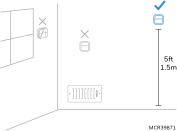
Leveling the indoor sensor
These sensors can be linked to the thermostat when doing the initial Installer setup or at a later date.
-
During initial installer setup, the thermostat will offer setup options under “Redlink Devices” for “Add device” or “Set up later”.
-
To add a sensor after initial setup has been done, select the Menu icon, then Devices & Sensors, then Add.
-
The display screen will walk you through linking and naming the sensor.
-
Wireless Outdoor Sensor Installation
C7089R3013 Wireless Outdoor Sensor
The C7089R3013 wireless outdoor temperature & humidity sensor can be used with up to eight ElitePRO™ Series Thermostats. The wireless outdoor sensor can be used for heat pump compressor lockouts, Aux Heat lockouts, humidity frost protection, and ventilation lockouts. Alternately, Internet weather could be used for these lockouts. A wired outdoor sensor can be used for all outdoor lockouts other than High Dewpoint Lockout for ventilation.
Connecting Wireless Outdoor Sensor
When the ElitePRO™ Series Thermostat is in the wireless setup mode and prompts you to do so, press and quickly release the CONNECT button on the Wireless Outdoor Sensor. After a short delay (up to 15 seconds), the thermostat will display “Wireless Outdoor Sensor Added.”
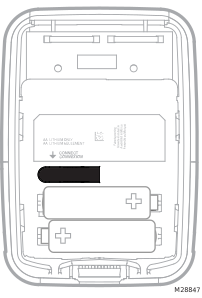
Mount Outdoor Sensor
-
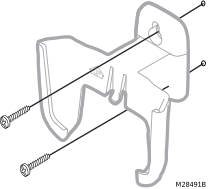
Mount the sensor on a vertical exterior wall, at least 6 inches below any overhang. Choose a location protected from direct sunlight.
-
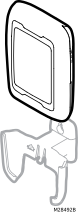
Place sensor securely in bracket, facing away.
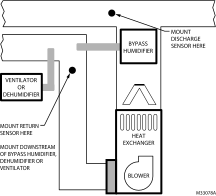
Selecting Optional C7735A1000 Return Air Temperature Sensor Mounting Location
When the return sensor is used with an ElitePRO™ Series Thermostat & EIM, If there's a communication loss with the thermostat, the backup algorithm will turn on heating stages if the return air temperature is < 56.0°F and run until the return air temperature reaches 58°F. The backup algorithm will turn on cooling stages if the return air temperature is > 88.0°F and run until the return air temperature reaches 86°
Install the Return Air Temperature Sensor on the return duct in a location where the air is mixed well. Mount the Return Air Temperature Sensor downstream of a Bypass Humidifier, Dehumidifier or Ventilator.
Selecting Optional C7735A1000 Discharge Air Temperature Sensor Mounting Location
When the discharge sensor is used with an ElitePRO™ Series Thermostat to shut off the cool call and run the fan if the A-Coil drops below the low limit setting in ISU 5110. Optional settings are OFF, 5°F to 65°F (-15°C to 18.5°C). Additionally, when a discharge and return sensor are used, the ElitePRO™ Series Thermostat will show these temperatures and the delta in the installer test mode when testing the heat and cool stages.
-
Mount the Discharge Air Temperature Sensor on the supply duct in a location where the air is mixed well. Mount the Discharge Air Temperature Sensor out of sight of the A-Coil/Heat Exchanger when possible.
-
Resideo does not recommend wiring a discharge sensor to the EIM in a zoned system. A discharge air sensor can be wired to a Resideo TrueZONE panel and the panel will do the high/low limit protection for the system.
-
If space does not allow a Discharge Air Temperature Sensor upstream of a Steam Humidifier or Fan Powered Humidifier, mount the Discharge Air Temperature Sensor downstream of the Humidifier.
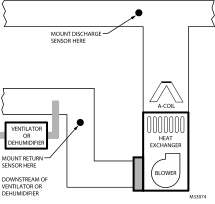
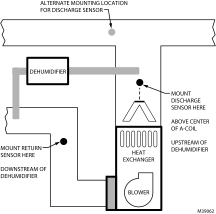
Mounting Discharge Air Sensor Downstream
Alternate Mounting of Discharge Air Sensor Downstream
Installing Optional C7735A1000 Discharge and/or Return Air Temperature Sensors
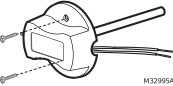
Use the following steps to mount the Discharge/Return Air Sensors:
-
Attach plastic cover to the sensor probe.
-
Drill 1/4-inch hole for the sensor probe and mount it to the ductwork with enclosed screws (see illustration below).
-
Connect wires to S1, S2, S3, or S4 terminals at the EIM or S terminals at ElitePRO™ Series Thermostat when EIM is not used.
-
Configure the ElitePRO™ Series Thermostat for discharge and/or return sensor.
Installing Wired Indoor Sensor
C7189U1005 (10K) Wired Indoor Sensor
ISU setting 5000, 5020, 5030, and 5040.
Use the following steps to mount the sensor:
-
Remove the cover from the remote sensor.
-
Pull wires through wire hole.
-
Position wallplate on wall, level and mark screw hole positions with pencil.
-
Drill holes at marked positions, then tap in supplied wall anchors.
-
Place wall plate over anchors, insert and tighten mounting screws.
-
Replace the cover on the remote sensor.
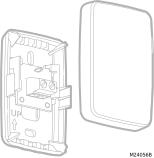
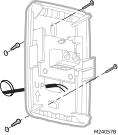
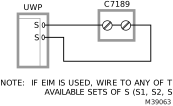
Wiring 1 C7189U1005 sensor (10k ohm) for temperature control. Select 10K in the Installer Setup (ISU 5030) when using C7189U1005 sensor(s).
Wiring 4 C7189U1005 sensors (10k ohm) for temperature averaging network. Select 10K in the Installer Setup (ISU 5030) when using C7189U1005 sensor(s).
If EIM is used, wire to any of the available sets of S (S1, S2, S3, S4).
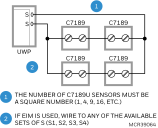
If EIM is used, wire to any of the available sets of S (S1, S2, S3, S4).
Installing Wired Outdoor Sensor
See ISU 1060 Outdoor Temperature for correct thermostat configuration.
Follow instructions included with C7089U1006 wired outdoor sensor.
A wired sensor cannot be wired to multiple controls (for example, two thermostats, a thermostat and zone panel, etc.). Doing so will cause operational issues, since the thermostat, zone panel or other control outputs voltage through the sensor to get a resistance reading and wiring the sensor to multiple devices will cause feedback. On the ElitePRO, this can result in a highly inaccurate indoor temperature reading, even if the thermostat is configured for a wired outdoor sensor instead of an indoor one.
Location and Mounting
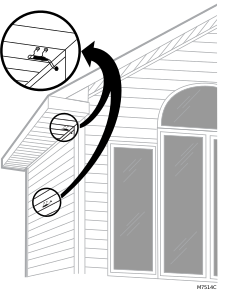
Mount the sensor where:
-
there is good air circulation.
-
it can measure true outdoor ambient temperature.
-
surface is flat.
-
wire distance between C7089U and thermostat is less than 200 feet.
Do not mount the sensor:
-
In direct sunlight.
-
Where hot or cold air blows on the sensor. Discharge line from an outdoor compressor unit, vent or fan causes inaccurate temperature readings.
-
Where snow, ice or debris can cover it.
Use the following steps to mount the sensor:
-
Remove the sensor from the mounting clip.
-
Mark the area on the location selected for mounting the sensor mounting clip.
-
Mount the clip.
ELECTRICAL INTERFERENCE (NOISE) HAZARD
Can cause erratic system operation.
Keep wiring at least one foot away from large inductive loads such as motors, line starters, lighting ballasts and large power distribution panels.
Use shielded cable to reduce interference when rerouting is not possible.
Floor/Slab Sensor
The ElitePRO™ Series Thermostat can be used with an AC112-01 or equivalent floor/slab sensor to control the ambient air temperature or floor temperature or both. You can choose among the following temperature control modes.
-
A mode: Controls and displays the ambient air temperature only.
-
F mode: Controls and displays the floor temperature only using an external floor temperature sensor. This control mode is suitable for areas such as bathrooms where floor temperature could be scheduled to be warm only during occupied, morning and evening periods.
-
(Floor temperature is indicated by “FLR” above the floor temperature reading. Floor temperature reading could also be displayed in the Thermostat MENU/ TEMPERATURES)
-
-
AF mode: Controls and displays the ambient air temperature as well as maintains the floor temperature within desired floor temperature limits using an external floor temperature sensor. Setting the minimum and maximum floor temperature limits is a way to enhance comfort and to protect the floor covering at the same time..
To set the thermostat temperature control mode, go to Installer Setup (ISU) and see settings (1055 & 5120-5170).
Floor/slab sensor wiring shown on following page.
Floor Temperature Sensor Installation
ElitePRO™ Series Thermostats are compatible with the AC112-01, 10K ohm floor temperature sensor or equivalent: A 10K ohm TekMar slab sensor could be used in place of the AC112-01 Floor sensor
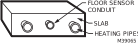
The floor temperature sensor needs to be installed mid way between the piping to ensure proper temperature reading (not over or right next to piping). Example: For a 12” pipe spacing install the sensor 6” away from the piping and ensure the sensor is vertically centered.
We recommend installing the floor temperature sensor inside of min. 0.5’’ PEX pipe. This simplifies future sensor replacement, if required.
In a small room, position the sensor in the center of the floor. In larger rooms, ensure the sensor is at least 7 feet from the wall.
Recommended Floor Temperatures Settings
Recommended maximum floor temperature is 90 °F (32 °C) for most floor covering types except wood. Suggested maximum floor temperature for wood floor is 85 °F (29.5 °C). Freeze protection temperature for garages and basements is suggested to be set between 41 °F to 45 °F (5 °C to 7.2 °C).
See ISU settings (1055, 3250, and 5120-5170)
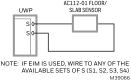
Floor/Slab sensor wiring to UWP
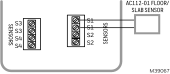
Floor/Slab sensor wiring to EIM
If EIM is not used, wire the floor sensor to the S terminal on the UWP. If EIM is used, the thermostat allows you to select any of the four sets of S terminals on the EIM OR the S terminals on the thermostat. Make sure the floor/slab sensor settings match the wiring configuration. See Installer Setup Options (ISU) (1055, 3250, and 5120-5170).
Erratic temperature readings from a sensor can occur as a result of any of the wiring practices described below. Avoid these practices to assure correct operation. Use shielded cable to reduce interference if rerouting of sensor wiring is not possible.
-
Be sure wires have a cable separate from the thermostat cable.
-
Do not route temperature sensor wiring with building power wiring, next to control contacts or near light dimming circuits, electric motors or welding equipment.
-
Avoid poor wiring connections.
-
Avoid intermittent or missing building earth ground.