Using the First Alert App
The First Alert app is used by the customer to control the thermostat
The First Alert App by Resideo is used by the customer to control and manage the thermostat after installation. During setup, the installer may guide the customer through connecting the thermostat to the app to enable remote control and monitoring.
Once connected, the customer can use the app to adjust settings, receive alerts, and manage the thermostat from their mobile device.
For more information, visit: info.honeywellhome.com/first-alert-app
Key App features
Device Control
Allows the customer to adjust temperature settings and system modes remotely using their mobile device.
Smart Home Integration
Supports integration with compatible smart home platforms for expanded control.
Connected Device Management
The app allows the customer to manage multiple compatible Resideo devices from one interface.
Professional Support
Customers can connect with their professional through the app to help coordinate service, support, and system upgrades.
The First Alert App is regularly enhanced and the screen display may differ from that shown.
Setting Up the App
Scan to download the First Alert App
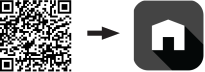
Touch the icon below to download the First Alert App:

To add the thermostat to the app, select MENU > Connect to App and follow the instructions to connect.
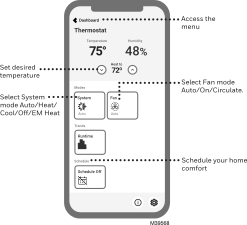
Use First Alert App to Remotely Control ElitePRO™ Series Thermostats
Use the First Alert by Resideo App to control your ElitePRO™ Series Thermostats while you're away from home or your business.