
1. Installation
1.1 Optional Cover Plate
Important: Before starting, turn the power off at the breaker box or switch.
Mounting with Existing Wall Anchors
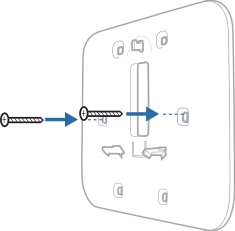
Align 2 or more of the Cover Plate's 6 screw holes with the existing wall anchors you wish to use.
1. Insert and tighten the mounting screws supplied with the cover plate. Do not overtighten. Make sure the Cover Plate is level.
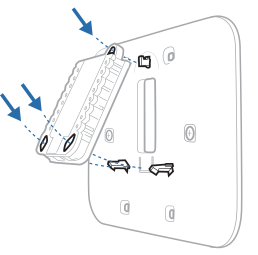
2. Attach the Universal Wall Plate (UWP) by hanging it on the top hook of the Cover Plate and then snapping the bottom of the UWP in place.
Mounting with New Wall Anchors
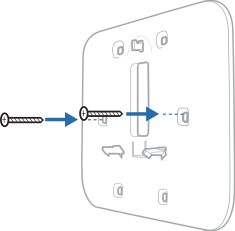
Position the Cover Plate on the wall; level and mark hole positions.
1. Drill holes at marked positions, then lightly tap the supplied wall anchors into the wall using a hammer.
-
If the product package contains red anchors, drill 7/32” (5.6mm) holes.
-
If the package contains yellow anchors, drill 3/16” (4.8mm) holes.
-
Use supplied screws (#8 1-1/2” (38mm) for red anchors and #6 1-1/2” (38mm) for yellow anchors). Do not overtighten the screws.
2. Attach the UWP by hanging it on the top hook of the cover plate and then snapping the bottom of the UWP in place.
1.2 Mounting UWP Without Cover Plate
Important: Before starting, turn the power off at the breaker box or switch.
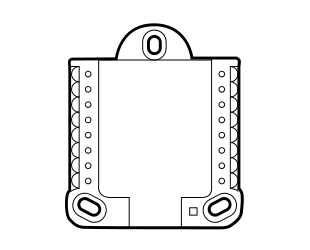
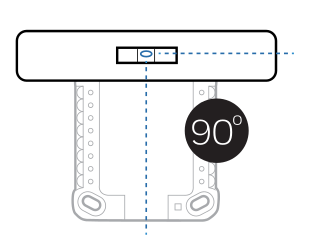
1. Position the UWP on wall. Level and mark hole positions.
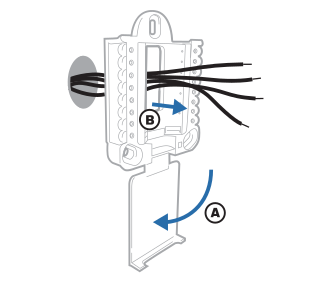
2. Pull the door open and insert the wires through the wiring hole of the UWP. This should be done whether the cover plate is used or the UWP is mounted directly to the wall.
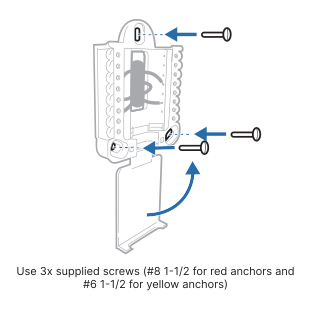
3. Drill holes at marked positions, and then lightly tap supplied wall anchors into the wall using a hammer.
-
If the product package contains red anchors, drill 7/32” (5.6mm) holes
-
If the package contains yellow anchors, drill 3/16” (4.8mm) holes.
4. Place the UWP over the wall anchors. Insert and tighten mounting screws supplied with the UWP. Do not overtighten. Tighten until the UWP no longer moves.
1.3 Detailed walkthrough video on Installing T Series Thermostats
For a detailed visual guide on mounting and wiring the UWP for the T Series Thermostats, please refer to the video embedded below. This tutorial comprehensively covers the installation procedures for models T3, T4, T5, T6, T9, T10, and T10+, providing step-by-step instructions and professional insights to ensure a precise and efficient installation.