6. Keypad Lockout
6.1 Locking the Keypad
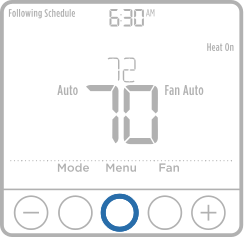
1. Press Menu on the thermostat.
2. Press  or
or  to go to LOCK. Press Select.
3. Press or to go to OFF, PART, or ON, and then press Select.
-
OFF: Unlocked, and full access allowed.
-
PART: Partial lockout, allowing only the temperature to be changed.
-
ON: No access allowed.
6.2 Unlocking the Keypad
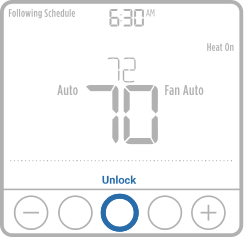
1. Press the CENTER button, then enter the password “1234”. (To enter the password, press or to change the first digit of the number. Then press Select. Repeat this process to enter the second through fourth digits of the number.)
2. Once all four numbers have been entered, press Select again. This will unlock the keypad.
-
If the code is incorrect, the screen will flash the lines "--". If this happens, press the Back button to go back a step to enter the correct number and press Select.
On some models, the Keypad Lockout setting may not be available in the user menu. This can occur if the installer did not configure the thermostat to allow this setting.
6.3 Keypad Lockout ISU Setting
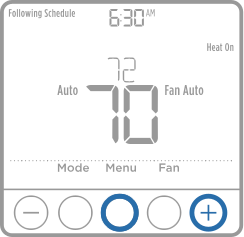
1. Press and hold the MENU and buttons for approximately 3 seconds to enter the Installer menu.
2. With "ISU" displayed, press Select to enter ISU Menu.
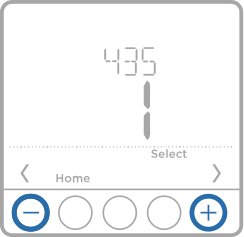
3. Press Select to cycle through ISU options to ISU# 435.
4. Press or button to change the lockout setting.
-
If the thermostat is pre-Series 7, the options will be 0 (unlocked), 1 (partial lockout), or 2 (full lockout).
-
If the thermostat is Series 7 or later, the options will be 0 (lockout feature disabled and not shown under menu) or 1 (lockout feature enabled and lockout setting turned on or off through the main menu setting).
5. Once you have set the lockout ISU to the correct setting press "Home" to save changes and exit ISU.
|
# ISU |
ISU Name |
ISU Options (factory default in bold) |
|
435 |
Keypad Lockout |
Series 0-6 (setting on original T6 models): 0 = None 1 = Partial 2 = Full
Series 7 (setting current T6 models): 0 = Disabled 1 = Enabled
Note: Due to customer feedback this feature was changed. On series 0-6 thermostats, you can lock out the thermostat from the ISU the same as you can from menu lockout. For series 7 or later, this setting allows the contractor to enable or disable the lockout feature. When disabled, there is no lockout option under menu. |
ISU#: 435
Keypad Lockout
Series 0-6 (setting on original T6 models):
0 = None
1 = Partial
2 = Full Series
7 (setting current T6 models):
0 = Disabled
1 = Enabled
Note: This feature has been changed in response to customer feedback. On Series 0-6 thermostats, you can lock out the thermostat from the ISU, the same as you can from menu Lockout. For Series 7 or later, this setting allows the contractor to enable or disable the Lockout feature. When disabled, there is no Lockout option under Menu.