System Operation
Settings
-
Press the MODE button to cycle to the next available System mode.
-
Cycle through the modes until the desired System mode is displayed.
Available System modes vary by model and system settings.
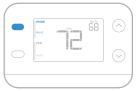
System modes:
-
AUTO
-
HEAT
-
COOL
-
OFF
Fan Operation Settings
-
Press the FAN button to cycle to the next available Fan mode.
-
Cycle through the modes until the desired Fan mode is displayed.
Available Fan modes vary with system settings.
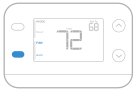
Fan modes:
-
AUTO: Fan runs only when the heating or cooling system is on.
-
ON: Fan is always on.
-
CIRC: Fan runs about 33% of the time to circulate air.
Alerts and Reminders
When an alert is active, an  icon will appear in the lower part of the display.
-
Press the lower left button, then the upper right button to show the alert over the temperature reading.
Some alerts can be resolved by the homeowner, for example Replace Batteries. Other alerts may require a service call to the professional installer.
|
Alert Number |
Alert Meaning |
|---|---|
|
405 |
Thermostat batteries are low. Replace batteries. |
|
407 |
Thermostat batteries are critically low. Replace batteries. |
|
170 |
Thermostat Memory Failure. Internal problem with the thermostat memory. |
|
173 |
Internal Sensor Error. Issue with the built-in temperature sensor. |
|
181 |
Replace filter (Reset this timer after replacing furnace filter by pressing and holding the upper left and lower right buttons for 5 seconds.) |
When the filter Reminder is active the  icon appears as well as Replace Filter.
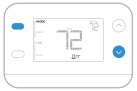
Battery Replacement
The display will alert you when the batteries are low and must be replaced.
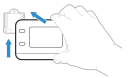
Remove the thermostat by pulling it away from its mount as seen at right.
Be sure to use fresh AA batteries and insert them as shown in step 5 of “Wiring the Thermostat”. After inserting the new batteries, align the thermostat with the mounting plate and push gently until the thermostat snaps back into place as seen in step 6.
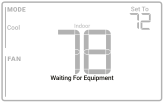
Waiting For Equipment
Damage can occur if your system’s compressor is restarted too soon after shutdown. The Built-in Compressor Protection feature forces the compressor to wait for a few minutes before restarting. During the wait time, the display will show the message “Waiting For Equipment” under the room temperature reading.
When the safe wait time has elapsed, the message disappears, and the thermostat will show “Heat on” or “Cool on”.