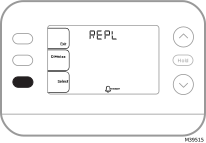
Alerts and Reminders
Alerts
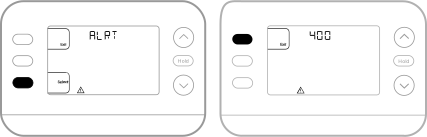
When an alert is active, a  icon will appear in the lower part of the display.
-
Press MENU and use ↑ or ↓ until the alert is shown. Active alerts will be the first menu items shown.
-
Press SELECT to display the alert number.
-
An alert cannot be dismissed. If there is more than one active alert, pressing the NEXT button allows you to view any additional alert numbers. Press EXIT to return to the home screen.
Some alerts can be resolved by the homeowner, for example Set Time and Date. Other alerts may require a service call to the professional installer.
|
Alert Number |
Alert Meaning |
|---|---|
|
164 |
Heat Pump Fault. Heat pump is energizing L terminal to indicate a fault. |
|
170 |
Thermostat Memory Failure. Internal problem with the thermostat memory. |
|
171 |
Set Time and Date. |
|
173 |
Internal Sensor Error. Issue with the built-in temperature sensor. |
|
388 |
Register thermostat online* |
|
399 |
No internet connection* |
|
400 |
WiFi signal lost* |
|
602 |
Humidity sensor failure* |
|
607 |
WiFi communication error* |
*If not using the app, WiFi and app related messages can be dismissed by going into the WiFi menu and turning WiFi to off.
Reminders
When a reminder is active, a  icon will appear in the lower part of the display.
-
Press MENU and use ↑ or ↓ until the active reminder is shown. Active alerts and reminders will be the first menu items shown.
-
Press SELECT to display the reminder.
-
Once selected you will see the reminder message in scrolling text. Press DISMISS to reset the reminder or press EXIT to return to the home screen without resetting the reminder.
If there is more than one active reminder, press the NEXT button to view all reminders which have not been reset.