Alerts and Reminders
-
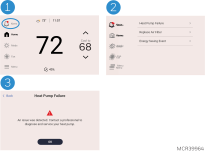
The Alerts icon will appear in the upper left of the active home screen when there is an active alert or notification. Touch the ALERTS icon to view active Alerts & Reminders.
-
Touch the alert or reminder heading to see more information about the alert.
-
Acknowledge the alert or reminder. Reminders will allow you to reset the timer. Less critical Alerts and notifications may allow options to snooze or dismiss.
IAQ Reminders
You can set up IAQ reminders in the thermostat to remind users when filters, pads, bulbs, etc. need cleaning or replacement.
-
Air Filter 1
-
Humidifier Pad
-
Dehumidifier Filter
-
UV Bulb 1
-
UV Bulb 2
To access or adjust the reminder settings
-
Select the Menu icon.
-
Scroll to and select Preferences > Reminder Settings.
-
Select the reminder you want to set from the list (shown above).
-
Touch 5or 6to set timer length. Ranges, increments and units will change based on the reminder.
-
Touch Save to save the reminder.
-
Touch Reset Timer when you have completed the recommended maintenance or you can extend the timer setting to turn off the alert and remind you later to do the recommended maintenance.
-
Repeat these steps for all reminders you want to set
When set for run time days, the thermostat tracks the amount of time the fan has run and compares that time against the number of run time days selected. Fan run time is counted when there is a call for forced air heating, cooling, or fan.