Getting Started With Installation
IMPROPER WIRING OR CONFIGURING OF YOUR THERMOSTAT CAN CAUSE UNINTENDED OPERATION OF YOUR HVAC SYSTEM WHICH COULD LEAD TO PROPERTY DAMAGE, INJURY, INCLUDING DEATH. IF YOU ARE UNSURE OF WHAT TYPE OF SYSTEM YOU HAVE, REFER TO YOUR HEATING/COOLING SYSTEM EQUIPMENT LITERATURE OR CALL AN HVAC PROFESSIONAL.
Watch the following installation video or use the written installation instructions below.
Video: Getting Started
Watch this video for step-by-step instructions on installing your thermostat.
Tools Needed for Installation
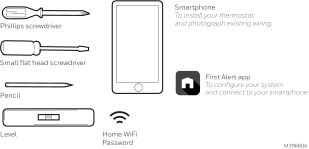
Tools you will need
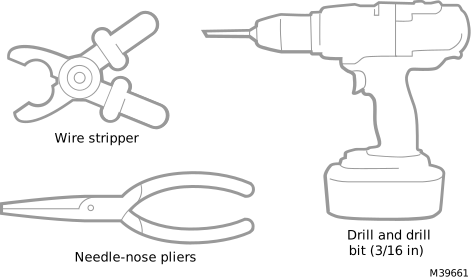
Tools you may need
Removing the old thermostat
-
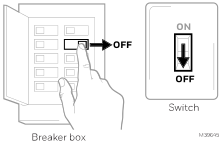
 Turn power OFF.
To protect yourself and your equipment, turn off the power at the breaker box or switch that controls your heating/cooling system. Some systems may have separate heating and cooling breakers.
-
Check that your system is off.
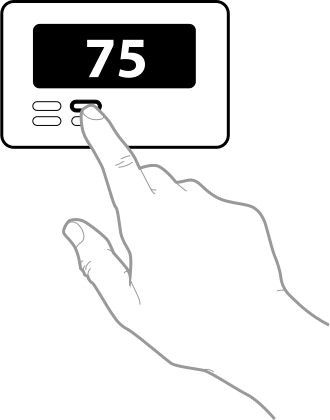
Change the temperature on your old thermostat to be above room temperature in heat mode or below it in cool mode. If you don’t hear the system turn on within 5 minutes, the power is off.
If you have a digital thermostat that has a blank display, skip this step.
-
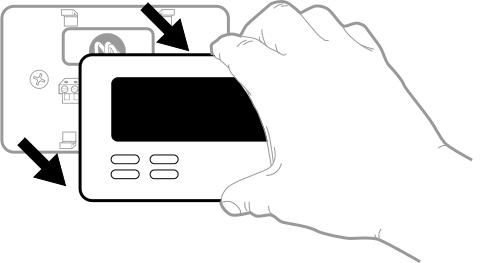
Remove the old thermostat’s faceplate.
On most thermostats, you can take off the faceplate by grasping and gently pulling. Some thermostats may have screws, buttons, or clasps.
Do not remove any wires from your thermostat at this time!
-
Make sure there are no 120/240V wires.
Do you have thick black wires with wire nuts?
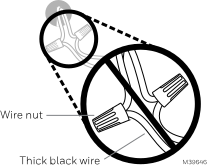
Is your thermostat 120V or higher? If you answered Yes to either of these questions, you have a line voltage system and the thermostat will not work.
-
Take a picture of how your wiring looks like right now.
Be sure to include the letters next to the terminals where the wires are inserted. This will be a helpful reference when wiring your thermostat.
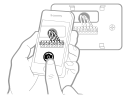
Tip: If the color of your wires has faded or if 2 terminals have the same wire color, use the wire labels provided in the package to label each wire.
-
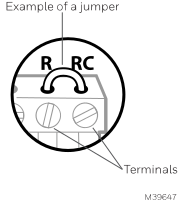
Make note of any jumpers
A jumper connects one terminal to another terminal. It may look like a small staple or even a colored wire.
-
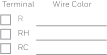
Record whether you have wires in the following terminals.
Do not include jumpers as a part of your count. This thermostat does not need jumpers.
-
Write down the color of the wires.
Check mark the wires that are connected to terminals. Next to the check mark, write down the color of the wire. Do not include jumpers as a part of your count.
Check all that apply (Not all will apply):
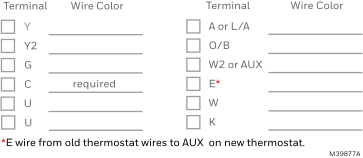
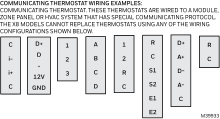
If there are wires in terminals that are not listed, you will need additional wiring support. See Additional wiring help for more information.
 Additional wiring help
There is not a standard color-code for thermostat wiring. That is why it is critical to note where each wire was attached before removing the wire. Taking a photo of the wiring with your phone and using the included wire-labels is important before disconnecting wires from the old thermostat.
In most cases the wires will match the same from the old thermostat to the new. However in some cases they do not. Below can provide some additional wiring assistance.
C-Wire Adapter
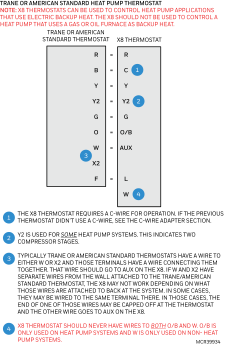
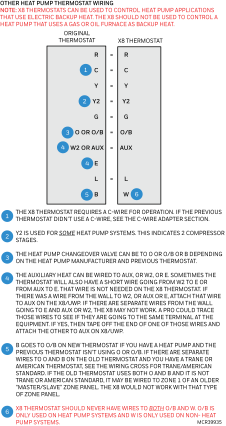
Resideo Wi-Fi thermostats requires a C-wire to power the display. If the previous thermostat did not have a wire connected to the C terminal but there is an extra wire in the bundle, that wire can be connected to the C terminal at both the thermostat and the furnace or air handler.
If there is no extra wire available and both the Y and G wires were connected on the previous thermostat, you can use a THP9045A C-wire adapter.
For more information on the THP9045A C-wire adapter, go to: C-WIRE Adapter Installation Guide
Video: Add a C-Wire Adapter
Watch this video for step-by-step instructions on adding a C-Wire adapter to a Resideo Wi-Fi thermostat.
-
Disconnect the wires and remove the old wall plate.
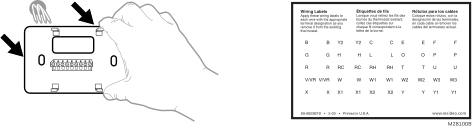
Use a screwdriver to release wires from terminals. Then, use a wire label to identify each wire as it's disconnected. The letter on the wire label should match the letter on the terminal.
Tip: To prevent wires from falling back into the wall, wrap the wires around a pencil.
Installing Your X8S & X8Q Smart Thermostat
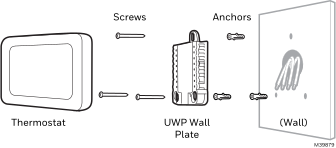
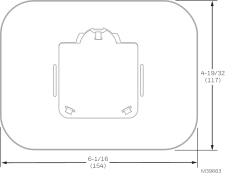
Hold the thermostat over the part of the wall it will mount to. Verify the thermostat covers any marks left by the previous thermostat. If not, patch and touch-up that area. Alternately, there are optional black or white cover plates available for purchase. If using a cover plate, that will mount to the wall differently than the UWP, so do not drill holes until the cover plate arrives.
Optional Cover Plate
THP2400WH (White cover plate)
THP2400BL (Black cover plate)
-
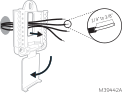
Bundle and insert wires through the UWP.
Pull open the UWP and insert the bundle of wires through the back of the UWP. Make sure at least 1/4-inch of each wire is exposed for easy insertion into the wire terminals.
-
Insert the wall anchors.
It is recommended that you use the wall anchors included in the box to mount your thermostat.
You can use the UWP to mark where you want to place the wall anchors.
-
Level the wall plate.
.svg)
-
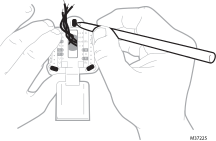
Mark the location of the wall anchors using a pencil.
-
Using a 3/16” bit, drill the holes.
-
Insert wall anchors.
-
Make sure anchors are flush with wall.
-
-
Set R-switch position and insert R-wire or wires.
Set the R-switch up or down based on your wiring notes in Record whether you have wires in the following terminals.
If you have 1 R-wire (R, Rh or Rc):
.svg)
or
If you have 2 R-wires (R or Rh, and Rc):
.svg)
-
Connect wires to the UWP.
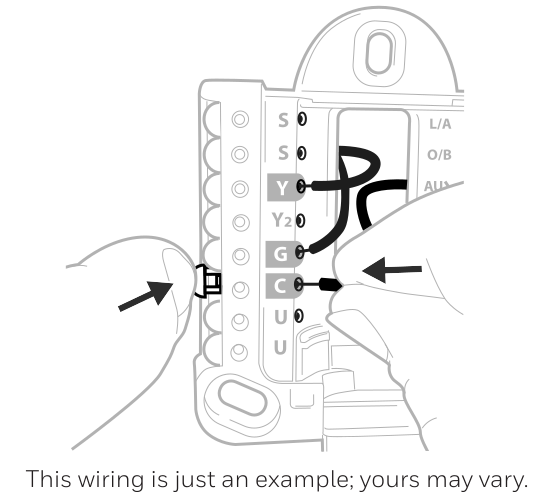
Refer to the notes you recorded on the chart during removal. Depress the tabs to put the wires into the inner holes of their corresponding terminals on the UWP (one wire per terminal) until it is firmly in place.
-
Confirm wiring matches snapshot.
Confirm that the wiring matches the terminals in the photo you took during removal.
If E was used, that wire should be connected to AUX on the UWP.
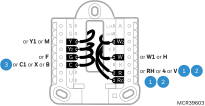
CONVENTIONAL SYSTEMS
Alternate wiring (for conventional systems)
If labels do not match terminals, connect wires as shown below:
Wiring Notes:
-
If you must connect both R and Rc wires, set the R Slider Tab to the down position (2 wires).
-
If your old thermostat had both R and Rh wires, set the R Slider Tab to the down position (2 wires). Then connect the R wire to the Rc terminal, and the Rh wire to the R terminal.
-
If your old thermostat had only one C or C1 wire, connect it to the C terminal. If your old thermostat had two C or C1 wires, call Honeywell Home support or a qualified contractor for help.
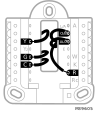
HEAT PUMP
Wiring Notes:
-
Match each labeled wire with same letter on new thermostat.
-
Insert the wires into the matching terminal.
If you have difficulty inserting wires, you may have to press down the terminal push button next to the corresponding terminal. If the labels do not match the letters on the thermostat, see the diagram above.
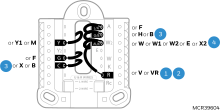
Alternate wiring (for heat pumps only)
Wiring Notes:
-
Keep R Slider Tab in the up position (1 wire).
-
If your old thermostat had both V and VR wires, stop now and contact a qualified contractor for help.
-
If your old thermostat had separate O and B wires, attach the B wire to the C terminal. If another wire is attached to the C terminal, stop now and contact contact a qualified contractor for help.
-
If your old thermostat had Y1, W1 and W2 wires, stop now and call Honeywell Home support or contact a qualified contractor for help.
Do NOT use W for heat pump applications. Auxiliary heat must wire to AUX.
-
-
-
Mount the UWP and close the door.
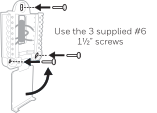
Mount the UWP using the provided screws. Install all three screws for a secure fit on your wall. Close the door after you’re finished.