Resideo Technician app
The Resideo Technician app allows the installer to:
-
Configure the thermostat and add the customer to create a record of the device, customer and location.
-
One touch configuration with ISU Templates.
-
Friction-free hand-off to homeowner so they can complete registration of their device and connect it to WiFi.
Steps
-
After powering the thermostat, follow the on-screen directions until it asks if you want to do setup on device or using the app. Select Using the app.
-
Open the Resideo Technician app. If you do not already have the Resideo Technician app, download the app and create your account.
Scan to download the Resideo Technician app:
Touch the icon below to download the Resideo Technician app:

-
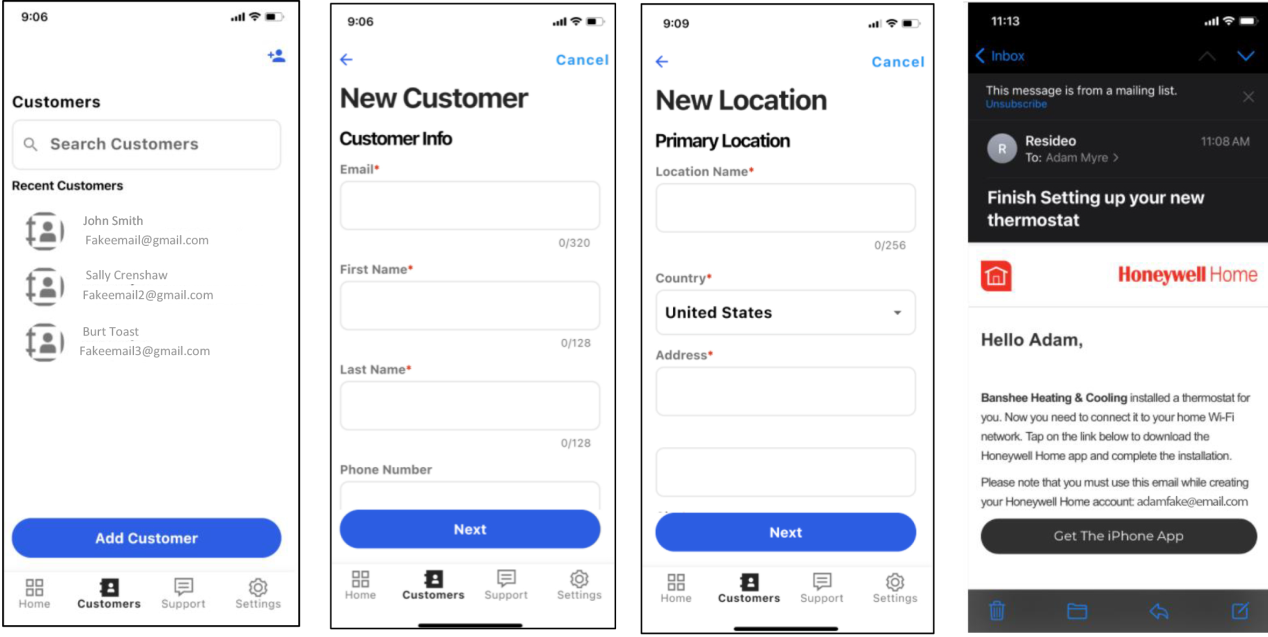
Select Customers.
If the thermostat installed is for an existing customer choose them from the list. If it is a new customer, select “Add customer”.
Once you have finished adding the customer information below, the app will send an email to the customer inviting them to download the app if they don’t already have the app or to connect the thermostat to WiFi if they already have the app and the thermostat wasn’t added to WiFi by the installer.