System Installation
When Installing This Product...
-
Read these instructions carefully. Failure to follow the instructions can damage the product or cause a hazardous condition.
-
Check the ratings given in the instructions to make sure the product is suitable for your application.
-
Installer must be a trained, experienced service technician.
-
After completing installation, use these instructions to verify the product operation.
Finding Your Date Code
You will need the thermostat Date Code to:
-
Add or remove RedLINK 3.0 accessories
-
Make changes to Installer Setup
-
Perform an Installer Test
-
Reset Thermostat to Factory Default Settings
To find the Date Code: Press the MENU (three horizontal lines). Scroll down and select Dealer Information.

|
CAUTION: ELECTRICAL HAZARD Can cause electrical shock or equipment damage. Disconnect power supply before connecting wiring. |
Selecting Thermostat Location
Install the thermostat about 5 ft. (1.5m) above the floor in an area with good air circulation at average temperature.
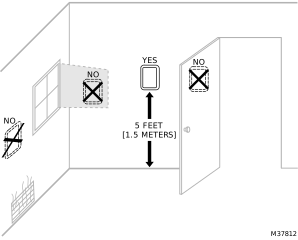
Selecting thermostat location
Do not install the thermostat where it can be affected by:
-
Drafts or dead spots behind doors and in corners
-
Hot or cold air from ducts
-
Radiant heat from sun or appliances
-
Concealed pipes and chimneys
-
Unheated (uncooled) areas such as an outside wall behind the thermostat
UWP Mounting System Installation
-
Open package to find the UWP. See Step 1 in the image below.
-
Position the UWP on the wall. Level and mark hole positions. See Step 2 in the image below.
Drill holes at marked positions, and then lightly tap supplied wall anchors into wall using a hammer.
Drill 7/32” holes for drywall. -
Pull the door open and insert wires through the wiring hole of the UWP. See Step 3 in the image below.
-
Place the UWP over the wall anchors. Insert and tighten mounting screws supplied with the UWP. Do not over-tighten. Tighten until the UWP no longer moves. Close the door. See Step 4 in the image below. Use 3x supplied screws #8 1-1/2”.
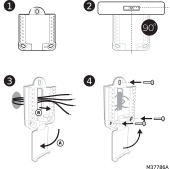
UWP Installation
Optional Decorative Cover Plate Installation
Use the Optional Cover Plate when:
-
Mounting the thermostat to an electrical junction box
-
Or when you need to cover paint gap from the old thermostat.
-
Separate the Junction Box Adapter from the Cover Plate. See Step 5 in the image below.
-
Mount the Junction Box Adapter to the wall or an electrical box using any of the eight screw holes. Insert and tighten mounting screws supplied with Cover Plate Kit. Do not over-tighten. Make sure the Adapter Plate is level. See Step 6 in the image below. Use 2x supplied screws #6 5/8”.
-
Attach the UWP by hanging it on the top hook of the Junction Box Adapter and then snapping the bottom of the UWP in place. See Step 7 in the image below.
-
Snap the Cover Plate onto the Junction Box Adapter. See Step 8 in the image below.
NOTE: Cover plate included with T10 or T10+ can vary by model.
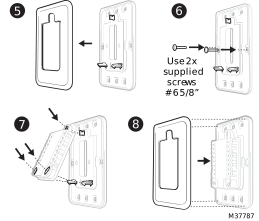
Decorative Cover Plate Installation
Wiring UWP
NOTE: If T10+ & EIM are used, UWP only wires to R and C of a 24 VAC power supply. Usually R and C from UWP goes to R & C at upper right of EIM.
Push down on the tabs to put the wires into the inner holes of their corresponding terminals on the UWP (one wire per terminal) until they are firmly in place.
Gently tug on the wires to verify they are secure.
If you need to release the wires again, push down the terminal tabs on the sides of the UWP. This wiring is just an example, yours may vary.
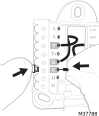
Wiring the UWP
Terminal Designations
Terminals on T10 or T10+ Without EIM
|
Conventional Systems |
Heat Pump Systems |
||
|
Terminal |
Description |
Terminal |
Description |
|
S/S |
Input for a wired sensor |
S/S |
Sensor options in charts |
|
Y |
Compressor Stage 1 |
Y |
Compressor Stage 1 |
|
Y2 |
Compressor Stage 2 |
Y2 |
Compressor Stage 2 |
|
G |
Fan Relay |
G |
Fan Relay |
|
C |
24VAC Common wire from secondary side of cooling transformer (if 2 transformers) |
C |
24VAC Common wire from secondary side of cooling transformer |
|
K* |
Connect to K on C-wire adapter |
K* |
Connect to K on C-wire adapter |
|
U/U** |
Relay for humidifier, dehumidifier, ventilator, or Economizer |
U/U** |
Relay for humidifier, dehumidifier, ventilator, or Economizer |
|
L/A |
Economizer fault |
L/A |
Typically used for compressor monitor |
|
W |
Heat Stage 1 |
O/B |
Changeover valve for heat pumps |
|
W2 |
Heat Stage 2 |
AUX |
Backup Heat |
|
|
|
E |
Emergency Heat |
|
R |
24 VAC Heating transformer |
R |
24 VAC Heating transformer |
|
Rc |
24 VAC Cooling transformer |
Rc |
24 VAC Cooling transformer |
*The THP9045A C-wire adapter is used on heat/cool systems when you only have four wires at the thermostat and you need an extra wire for a common wire. Use the K terminal in place of the Y and G terminals on conventional or heat pump systems to provide control of the fan and the compressor through a single wire the unused wire then becomes the common wire. See THP9045 instructions for more information.
** See note on Wiring U terminals on the following page.
Terminals on THM04R3000 Equipment Interface Module (EIM) Used With T10+ Models Only.
|
Conventional Systems |
Heat Pump Systems |
||
|
Terminal |
Description |
Terminal |
Description |
|
S1, S2, S3, S4 (Two of each) |
Input for indoor sensor, outdoor sensor, Floor sensor, RATS, DATS, or Dry Contact Alert |
S1, S2, S3, S4 (Two of each) |
Input for indoor sensor, outdoor sensor, Floor sensor, RATS, DATS, or Dry Contact Alert |
|
Y |
Compressor Stage 1 |
Y |
Compressor Stage 1 |
|
Y2 |
Compressor Stage 2 |
Y2 |
Compressor Stage 2 |
|
G |
Fan Relay |
G |
Fan Relay |
|
C |
Common from HVAC transformer when R is jumped to Rc. Common from separate transformer if R is not jumpered |
C |
Common from HVAC transformer when R is jumped to Rc. Common from separate transformer if R is not jumpered |
|
U1, U2, U3 |
Relay for humidifier, dehumidifier, ventilator or Economizer |
U1, U2, U3 |
Relay for humidifier, dehumidifier, or ventilator or Economizer |
|
L |
Economizer fault code |
L |
Typically used for compressor monitor |
|
O/B |
Not used for conventional applications |
O/B |
Changeover valve for heat pumps |
|
W1 |
Heat Stage 1 |
W1 |
Not used for heat pump applications |
|
W2 |
Heat Stage 2 |
AUX1 |
Stage 1 of AUX/EM heat |
|
W3 |
Heat Stage 3 |
AUX2 |
Stage 2 of AUX/EM heat |
|
R |
24V from transformer to power EIM |
R |
24V from transformer to power EIM |
|
Rc |
24 VAC Cooling transformer |
Rc |
24 VAC Cooling transformer |
|
Rh |
24 VAC Heat transformer |
Rh |
24 VAC Heat transformer |
2-Pipe Fan Coil Unit Terminals
Supported by T10+ with firmware 03.03.08.02 or later and EIM (if used) with firmware 01.02.01.00 or later
2-pipe fan coil unit terminals at thermostat/UWP when EIM is not used with T10+
|
Terminal |
Description |
|
Rc
R |
R and Rc are usually jumpered together (slider switch up) on a 2-pipe FCU with the 24 VAC hot to R. If the Aux Heat is powered by a separate transformer you may slide the R/Rc switch down, then aux heat is wired to R and Aux. FCU is wired to Rc, C, Y, G, etc. |
|
C |
24 VAC common from fan coil unit transformer |
|
Y |
Heat/Cool relay |
|
W |
Not used on 2-pipe fan coil unit |
|
G |
Low speed fan |
|
Y2 |
Medium speed fan |
|
U (upper U terminal) |
High speed fan. U slider switch must be up |
|
Aux / W2 |
Auxiliary Heat (Some 2-pipe fan coil units do not have auxiliary heat) |
|
S, S* |
Optional wired 10K/20K pipe sensor for changeover |
|
L/A - A* |
Dry contact switch for pipe changeover from Heat to Cool |
|
O/B |
Not used on 2-pipe fan coil unit |
|
*The T10+ uses either a wired 10K or 20K pipe sensor to the S terminals, or a dry contact switch to L/A to tell the T10+ whether the pipe is hot or cold. The ISU settings allow you to choose the method being used. If a dry contact switch is wired to L/A, the T10+ allows you to use the S terminals for a wired indoor or outdoor sensor. |
|
2-pipe fan coil unit terminals when EIM is used with T10+
|
Terminal |
Description |
|
R
Rc
Rh |
Typically R, Rh and Rc would be jumpered together for a 2-pipe fan coil unit with that transformer wired to R and C. If jumpers are removed, R and C power the EIM, Rc is the 24 volt hot from fan coil unit. Rh and Aux may be used for an auxiliary heat source if that source is powered by a separate transformer. If using the L/A for Heat/Cool changeover, R and Rc must be jumped |
|
C |
24 VAC common from the transformer powering the fan coil unit. |
|
Y |
Heat/Cool relay |
|
W |
Not used on 2-pipe fan coil unit |
|
G |
Low speed fan |
|
Y2 |
Medium speed fan |
|
U1, U2, U3 |
High speed fan. During setup, select which U contacts are used for this. Jumper one of the U terminals from the set selected to R as shown in wiring diagrams |
|
Aux1 |
Auxiliary Heat (Some 2-pipe fan coil units don’t have Auxiliary Heat) |
|
S1, S2, S3, S4* |
Optional wired 10K/20K pipe sensor for changeover the Set of S terminals used for this is selected during setup. The other 3 sets of S terminals could be used for an optional 10K/20K wired indoor sensor, 10K wired outdoor sensor, dry contact alert, or remote setback with dry contact occupancy sensor |
|
L* |
Dry contact switch for pipe changeover from Heat to Cool |
|
OB |
Not used on 2-pipe fan coil unit |
|
* The T10+ uses either a wired 10K or 20K pipe sensor to the S terminals, or a dry contact switch to L/A to tell the T10+ whether the pipe is hot or cold. The ISU settings allow you to choose the method being used. If a dry contact switch is wired to L/A, the T10+ allows you to use the S terminals for a wired indoor or outdoor sensor. |
|
4-Pipe Fan Coil Unit Terminals
Supported by T10+ with firmware 03.03.08.02 or later and EIM (if used) with firmware 01.02.01.00 or later
4-pipe fan coil unit terminals at thermostat /UWP when EIM is not used with T10+
|
Terminal |
Description |
|
R
Rc |
R and Rc must be jumpered together (slider switch up) on a 4-pipe FCU with the 24 VAC hot from FCU transformer to R. If the Aux Heat is powered by a separate transformer an isolation relay will be needed from the Aux terminal on UWP |
|
C |
24 VAC common from fan coil unit transformer |
|
Y |
Cool relay |
|
W |
Heat relay |
|
G |
Low speed fan |
|
Y2 |
Medium speed fan |
|
U (Upper U terminal) |
High speed fan. U slider switch must be up |
|
Aux/W2 |
Auxiliary Heat |
|
S,S |
Optional 10K/20K wired indoor sensor or 10K wired outdoor sensor |
|
L/A - A |
Optional remote setback switch |
|
O/B |
Not used on 4-pipe fan coil unit |
4-pipe fan coil unit terminals when EIM is used with T10+
|
Terminal |
Description |
|
R
Rc
Rh |
Typically R/Rh/Rc terminals are all jumpered together for this application. Rh, and Rc must be jumpered together for a 4-pipe fan coil unit.The R jumper may be removed to power the EIM with a separate transformer unless the L is used for changeover. If Aux Heat is powered off a separate transformer, an isolation relay would be needed. |
|
C |
24 VAC common from the transformer powering the fan coil unit. |
|
Y |
Cool relay |
|
W |
Heat relay |
|
G |
Low speed fan |
|
Y2 |
Medium speed fan |
|
U1, U2, U3 |
High speed fan. During setup, select which U contacts are used for this. Jumper one of the U terminals from the set selected to R as shown in wiring diagrams. Additional U contacts can be used for humidifier, dehumidifier, or ventilator |
|
Aux1 |
Auxiliary Heat (Some 4-pipe fan coil units don’t have auxiliary heat) |
|
S1, S2, S3, S4 |
Any set of S terminals can be used for an optional 10K/20K wired indoor sensor, a 10K wired outdoor sensor, dry contact alerts, or remote setback with dry contact occupancy sensor. |
|
O/B |
Not used on 4-pipe fan coil unit |
Setting Slider Tabs
Set R Slider Tab
-
Use built-in jumper (R Slider Tab) to differentiate between one or two transformer systems.
-
If there is only one R wire, and it is connected to the R, Rc, or RH terminal on the old thermostat, set the slider to the up position (1 wire).
-
If there is one wire connected to the R terminal and one wire connected to the Rc terminal, set the slider to the down position (2 wires).
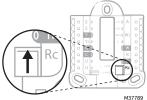
Setting the R Slider tab
Set U Slider Tab
-
Use built-in jumper (U Slider Tab) for IAQ device.
-
When the U Slider Tab is in the down position (2 wires) the U contacts are a dry set of contacts.
-
If your IAQ device is powered by the cooling transformer, move the U Slider Tab to the up position (1 wire). When this is done, the lower U terminal is internally jumped to the Rc terminal. In this application, you would hook up one wire from your IAQ device to the upper U terminal and the other to the common side of the cooling transformer. The 1 wire setting is most commonly used when using a fresh air damper for ventilation or using low speed fan for dehumidification.
-
See Wiring Diagrams.
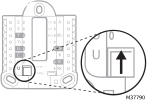
Setting the U Slider Tab